
A Friend Gave You 14 Days of TypingMaster Premium
Premium Edition — all features unlocked
Download TypingMaster, find your Hardware ID, and claim your free 14-day Premium license — takes about 2 minutes.
1
Download TypingMaster 12
Free download · Windows only · No registration required
2
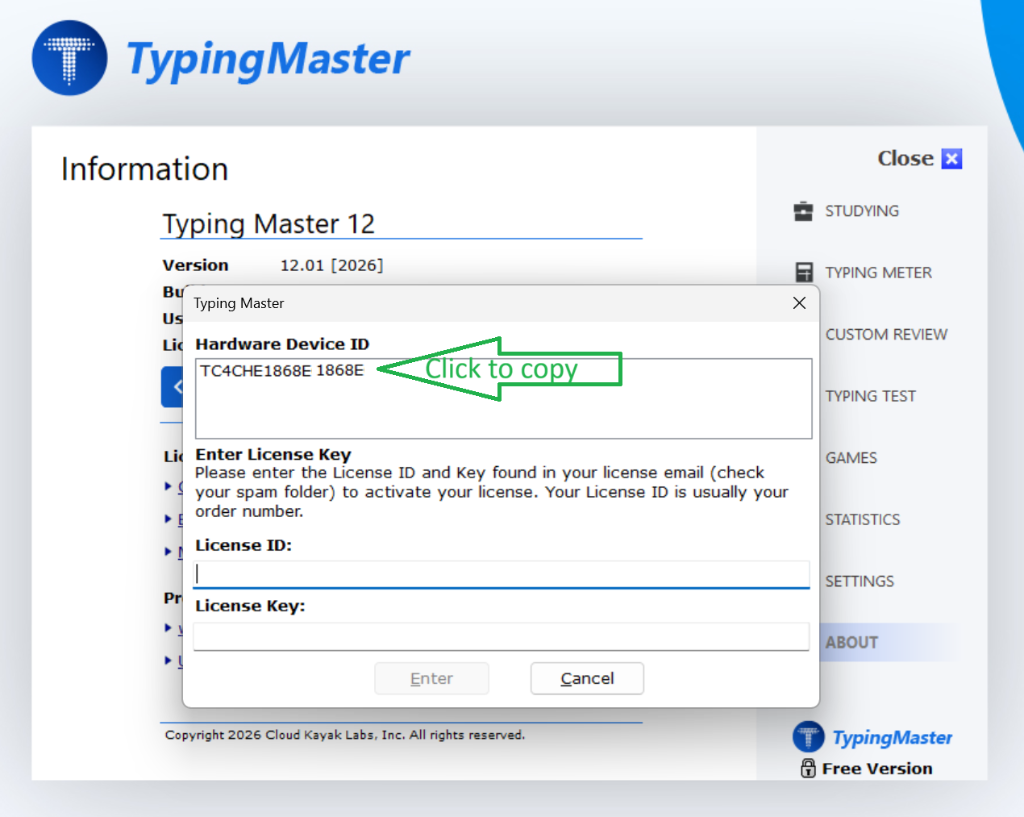
Get Your Hardware ID
- Install and open TypingMaster 12
- Go to the About page inside the app and click Enter License Key
- Your Hardware Device ID appears at the top — click it to copy it to your clipboard
3
Claim Your Free License
Paste your Hardware ID and get your free 14-day Premium license key instantly.
TypingMaster 12 is a touch typing tutor that adapts to your unique needs, featuring both training and an advanced typing test. Enjoy over 10 hours of customized exercises that guide you step by step to professional-level keyboarding. As a result, your typing speed is likely to double — or even triple — and you will save hours of valuable working time.